Wednesday, August 15, 2018

Xiaomi Pocophone F1 launching in India on August 22, new hands-on video leaked

Xiaomi Pocophone F1 launching in India on August 22, new hands-on...

Until last week, we were sure that Xiaomi is working on Pocophone F1, the company’s first phone under its sub-brand Poco. A few company executives dropped hints on Twitter that the smartphone in question will soon be coming to India. Now, 'Poco India', a Xiaomi subsidiary has announced that the Pocophone F1 will launch in the country on August 22. Interestingly, just when the launch date was announced, a video was leaked showing the phone in its entirety. This development comes on the heels of another video which confirmed that the Pocophone F1 will come with the Qualcomm Snapdragon 845 chipset.


'More than peak performance, more than speed - the best of smartphone innovation is almost here. Brace yourself for the #MasterOfSpeed. See you on August 22, 2018. #POCOF1,” the Poco India tweeted. It also posted the photo of the event date and the place of the launch. The smartphone is said to be the cheapest phone to be powered by the Snapdragon 845 SoC coupled with 6GB RAM and 64GB built-in storage. It may come with a 4000mAh battery. The information on the chipset and battery were also revealed on the retail box in the unboxing video that followed the date announcement.

According to the five-minute video of the Pocophone F1 by GSM Dome, the back panel of the phone is made of plastic. On the back, there is an AI dual-camera setup followed by a fingerprint sensor -- all in one enclosure. The dual-cameras have a red ring around them, just like what we have seen on Nubia smartphones. The smartphone has a ‘notched’ display with a chin and thin bezels. There is a headphones jack on the top, a USB-C port and two speaker grilles at the bottom.


Pocophone F1 is expected to come with a liquid cooling technology. If you notice, there is a sticker on the box that mentions “Liquid Cooling”. The same feature was discussed when the alleged device got a Bluetooth Certification earlier this year. The video also shows that the phone is running on MIUI 9. The company has already launched MIUI 10 and it is expected that the phone will get the MIUI OTA update.

Reliance Jio GigaFiber registrations start August 15: Plans, expected pricing, area availability, and all you need to know

Reliance Jio GigaFiber registrations start August 15: Plans, expe...

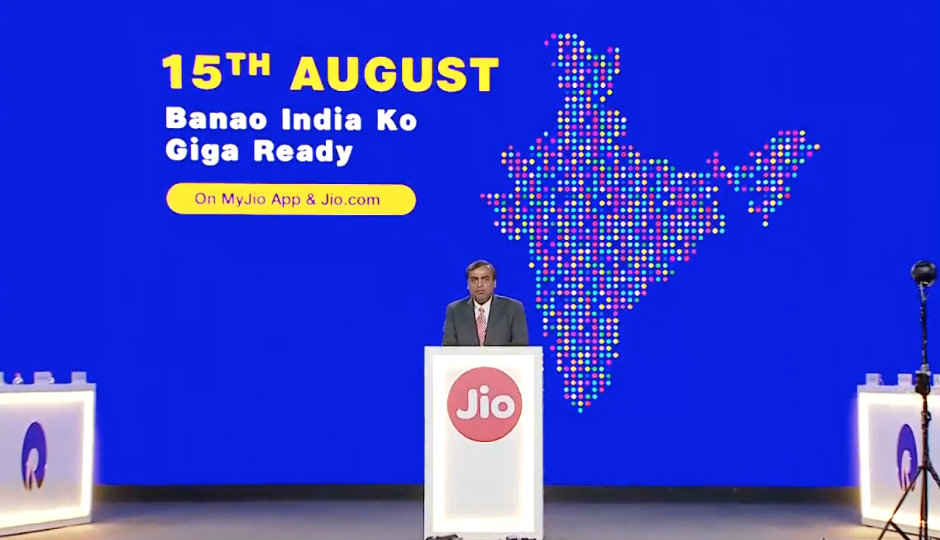
Reliance Jio announced its next firestarter after the JioPhone - JioGigaFiber - last month at RIL's Annual General Meeting (AGM). The fiber-to-the-home (FTTH) broadband internet service by Jio has been under testing since more than a year and the company will finally start accepting user registrations for JioGigaFiber this Independence Day. That is, if all goes to plan. As was the case with the JioPhone when it first launched back in 2017, JioGigaFiber is already reported to be facing some last mile connectivity issues which could hinder its plans for a mass-scale roll-out. As of now, there is no concrete information available on the exact roll-out date for JioGigaFiber, but Reliance Jio has confirmed that the FTTH broadband service will be available across 1100 cities in India on the basis of registration requests received by the company.

Reliance had also introduced the JioGigaTV set-top-box alongside JioGigaFiber. JioGigaTV is an internet connected 4K UHD set-top-box which could be bundled with the JioGigaFiber service, but it’s not yet confirmed if users will need to shell out extra cash to get the media streaming box along with Jio’s internet connection.

Here’s all you need to know about Jio’s 1Gbps broadband service for homes.

How to register for JioGigaFiber?

JioGigaFiber with speeds of up to 1Gbps will be rolling out to 1100 cities across India sometime after August. However, registrations for the high-speed fiber broadband service will start on August 15. Those interested can register for JioGigaFiber on the MyJio app or on Jio.com starting August 15. The region/city for which the company receives the most amount of registrations will get JioGigaFiber connectivity first.
Reliance Jio has been conducting beta trials for JioGigaFiber across the country and the service will be rolling out for commercial use, home use, and use by small businesses & merchants post the completion of the registration process. Jio aims at reaching 500 crore homes and 3 crore merchants across India with its JioGigFiber services.

JioGigaFiber plans and pricing

There have been no official announcements made by Reliance Jio on the pricing plans for JioGigaFiber, but a recent report by ET suggests that plans for the 1Gbps broadband service could start as low as Rs 500 per month. According to the report, Jio’s home broadband service will be even more affordable than its own or any other telecom operator’s 4G internet services. Another report by track.in lists out potential JioGigaFiber plans. In the report, a 50 Mbps speed plan with 500GB data is seen listed at Rs 499 per month. The pricing of the supposed Jio Fiber plans is seen going all the way up to Rs 3,599 for a 600 Mbps plan that provides 2,000GB of data for 30 days. These plans could very well be completely different from the official JioGigaFiber plans, but are in line with the latest ET report mentioned above.
The JioGigaFiber Preview plan currently available to limited users offers up to 100 Mbps speeds for 90 days along with a monthly data quota of 100 GB and a complimentary access to a host of Jio's premium apps. In case, you consume 100 GB of your data quota within a month you can continue to enjoy our high speed internet services by performing a complimentary data top-up of 40 GB via MyJio App or through Jio.com. As this is a preview offer, there are no installation charges levied but there is a refundable security deposit of Rs.4,500 taken for the ONT device (GigaHub Home Gateway). This amount needs to be paid through Debit card, Credit Card, Jio Money or Paytm.
For the official rollout, JioGigaFiber will come with the Jio GigaRouter. One can expect to pay a refundable security deposit for the router.

JioGigaFiber final availability

According to the above cited ET report, Reliance Jio could finally kickstart its gigabit broadband services before November 7. A source told the publication that JioGigaFiber could initially launch in “the metros and about 80 top tier 1 and 2 markets”.
We at Digit had earlier reported that the company has a December 2018 deadline to rollout Jio Fiber services and that they will initially be rolled out to top twenty cities across India including, Mumbai, Delhi, Kochi, Bhopal, Chandigarh and others, followed by a broader rollout as the company wants to establish a wide user-base in Tier-I and Tier-II cities first.

JioGigaTV features and availability

JioGigaTV is an internet connected 4K UHD set-top-box which will house Jio’s suite of apps such as - JioTV, JioCinema, JioSmartLiving, JioStore, JioCloud and more. By the looks of it, users will also be able to cast their own media onto their TVs through the the JioGigaTV box, given that there is a MediaShare app also seen on its UI.
A unique service announced by Jio for the JioGigaTV is TV Calling. The JioTVCall service will allow users of the JioGigaTV set-top-box to make video calls to each other through their television sets. Since JioTVCall will be an app, users will also be able to call any other mobile or tablet which houses the app and calls will be allowed across all networks.
The JioGigaTV set-top-box will come with a Jio Remote which will be enabled for voice commands, just like the JioPhone.
There is no word yet on the pricing, plans or availability of the JioGigaTV.

JioPhone 2

August 15 is also the date when the JioPhone 2 will go up for pre-booking.

Wednesday, August 1, 2018

First radioactive molecule detected in space after three decades of a celestial event

First radioactive molecule detected in space after three decades...

For the first time ever, scientists have observed a radioactive molecule in space that originates from an ancient stellar explosion. As per Space.com, via a study published in the journal Nature Astronomy, the detected 26AlF radioactive molecule was radiated when a red nova occurred in the 17th century, which was observed by astronomers as a brightly shining phenomenon in the Vulpecula constellation. Red Nova is similar to a supernova, but instead of one, two stars are involved and they merge in an explosive event, which is followed by a cool off. While cooling-off, they produce large amounts of molecular gas and dust. 

The molecular gas, 26AlF is a radioactive isotope of aluminum in the leftovers of the Nova which is called CK Vul (or Nova Vul 1670). Even though space is filled with various kinds of radiations, it’s the first time a radioactive molecule has been detected there. Additionally, this is also the first time that an entity producing the radioactive 26AlF isotope has directly been identified. The discovery was made by an international research team led by Tomasz KamiÅ„ski from the Harvard-Smithsonian Center for Astrophysics. After three centuries, in 2013, astronomers linked the radiation of an unusual isotopic molecular gas to the stellar event. This rekindled interest in the Nova and now, the new investigation lead by KamiÅ„ski and his research team has shown that the Nova was likely caused by the merger of two stars in what is known as a Red Nova.

As per a Max Planck Institute for Radio Astronomy report, observing the 26AlF molecule scientists will be able to better understand how the stars merged in the CK Vul. “The observations constrain the nature of the binary system that merged more than 300 years ago: a low-mass binary that contained a red-giant-branch star of a mass of 0.8-2.5 solar masses.” The observation is said to provide direct insight into the merger process in CK Vul, revealing that even the denser inner layers of stars can eventually be exposed in a stellar collision.

Android One : Xiaomi Mi A2 to come on August 8 as Amazon exclusive smartphone in India

Xiaomi Mi A2 to come on August 8 as Amazon exclusive smartphone i...

Last week, Xiaomi launched its much-awaited Mi A2 smartphone under Google’s Android One programme in Madrid, Spain. At the event. it was announced that the phone will be available in 40 countries globally, including in India. Finally, the wait is over and the Chinese conglomerate has decided to make the phone an Amazon exclusive device in the country. People can now see a rolling ad on the homepage of Amazon.in website.

When you click on the ad, a new special page comes up showing a “Notify Me’ button. You can click the button to set a notification. The website will send you a notification when the phone becomes available. The special page also contains tiles that give info about the features of the smartphone. When you scroll down futher, you can see media reviews of the device. To promote its camera, the company has also uploaded half a dozen camera samples under a banner caption “#ShotonMiA2”.
Xiaomi Mi A2 Specifications: The Xiaomi Mi A2 has an aluminum unibody design and comes with a USB Type-C charging port. It has a 5.99-inch Full HD+ IPS panel with an aspect ratio of 18:9. The panel is protected by a 2.5D Corning Gorilla Glass 5. An Octa-core Qualcomm Snapdragon 660 chipset clocked at 2.2GHz powers the smartphone. Xiaomi launched Mi A2 in three variants - 4GB RAM + 32GB storage, 4GB RAM + 64GB storage, and 6GB RAM + 128GB storage. It is not known which models will the company release in India and the prices were also not revealed on Amazon.
On the back, it has a fingerprint sensor in the centre and a dual-camera setup aligned vertically on the top left corner. In terms of optics, theMi A2 comes with a dual-camera system on the back. The primary camera has a 12MP Sony IMX486 sensor and the secondary 20MP consists of a Sony IMX376 sensor for portrait photography. Both the lenses have f/1.75 aperture. There is a 20MP front camera with Sony IMX376 sensor and Xiaomi's Super Pixel Technology. The phone is available in three colours - Gold, Blue and Black.

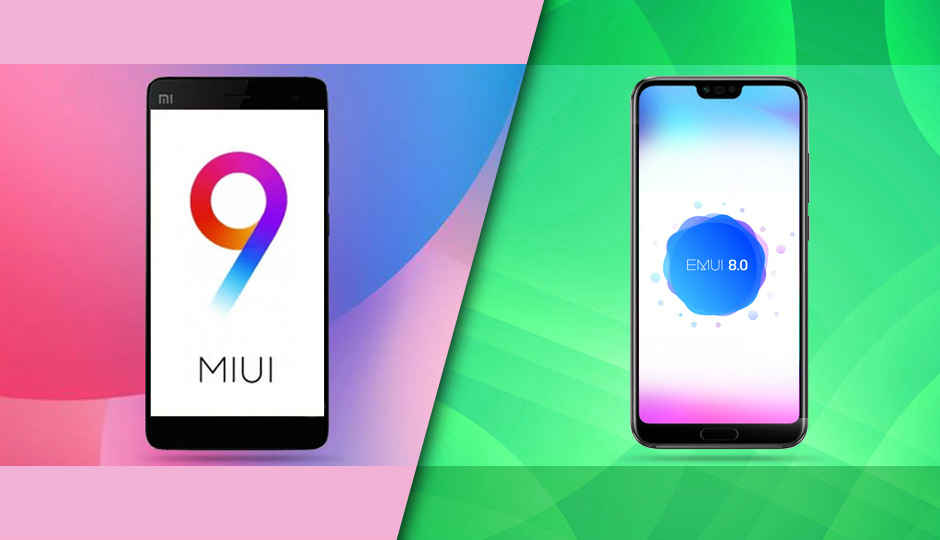
UI showdown: EMUI 8.0 vs MIUI 9.5

UI showdown: EMUI 8.0 vs MIUI 9.5

Android is the world’s most widely used mobile operating system. There are over two billion monthly active users of devices powered by the OS developed by Google. But not every Android device is made the same. While the base layer is the same for everyone, the interface of Android devices vary like chalk and cheese. There’s stock Android that is the purest, vanilla form of Android. You see it in devices like the Pixel 2, the Nokia 7 Plus and the likes. But over the years, OEMs have increasingly put efforts to differentiate themselves based on the software experience they offer. Some have ditched the app drawer in the UI, some have their own launcher animations, while some have introduced features that stock Android doesn’t have. As a result, Android is fragmented not just by their versions, but also by the software on top of Android which the users end up loving or hating.

In India, the highest selling smartphone brand is Xiaomi which uses a highly customised version of Android termed MIUI. There’s also Huawei and Honor which again tweaks the structure of Android to offer EMUI. Then there’s Samsung with Samsung Experience, Oppo with ColorOS, Asus with ZenUI and a lot more. With the Mi A2’s launch right around the corner, it’d be interesting to gauge how well a stock Android Xiaomi will be accepted by the public. Interestingly, in a poll conducted by Xiaomi themselves, people increasingly voted in favour of stock Android over MIUI. That poll was quickly taken down, for obvious reasons. But even though a small segment of internet-savvy users voted for stock Android, MIUI-powered devices are the highest-selling. Huawei/Honor’s EMUI is also being largely accepted by the people. The brand entered the  top 5 list this year and claims to be the fastest growing among all smartphone brands in India.

With the market flooded by Xiaomi and Honor devices, we decided to take a look at what their respective UIs offer, where they are different and whether there are any glaring flaws. However, the point remains that while hardware can be objectively tested to claim one is better than the other, choosing the best UI is a subjective decision. My opinion in this piece may differ from yours and with that out of the way, let’s begin!
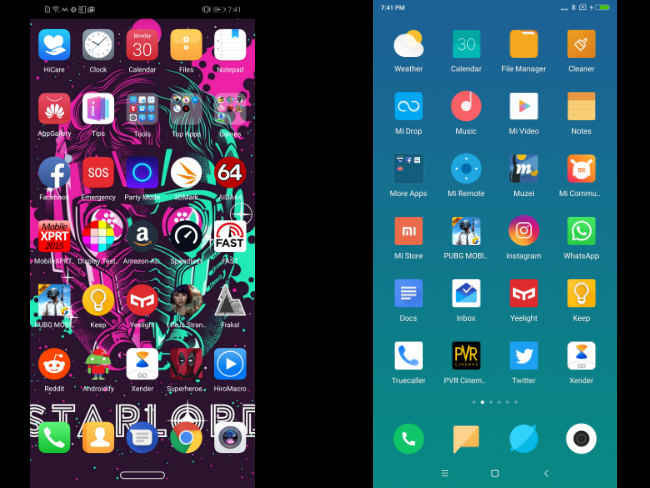


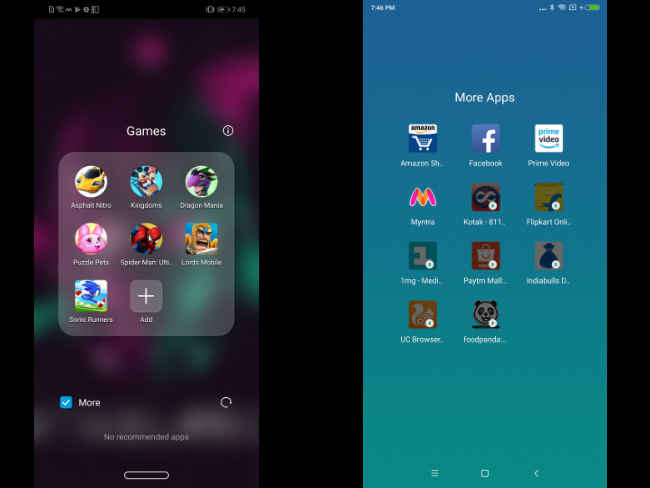
The home screen layout of MIUI and EMUI are both pretty similar. Both take more inspiration from Apple than Google in this case. Both UIs cram the icons in the home screen itself by default, although EMUI does provide the option to turn on a dedicated app drawer where the apps are alphabetically arranged. Normally, all apps and widgets will be present in the home screen itself. You can group the apps into folders and keep only the important ones permanently at the bottom of the screen.
Between the two, MIUI takes inspiration from Google’s Material Design. The icons are flat and menu options show up as cards. EMUI, in that case, is more unique. Icons are asymmetrical and are quite large by default. EMUI feels more crammed for this reason.
You can pinch out to enter the personalisation menu in both the cases, where you can rearrange apps, add widgets, change wallpapers and change the launcher settings.
Then there’s the minus-one screen. When you swipe right from the main home screen on MIUI, you enter what Xiaomi calls the vault. There you get the Google Search bar, shortcuts to the apps you use frequently, widgets, notes and more. EMUI’s minus-one screen houses the Google Search home screen where it displays news articles on topics you like, sports scores, weather and more.
Verdict: As far as home-screen goes, the choice in this case is between functionality and aesthetics. If you’re looking for something that is aesthetically pleasing, MIUI is the one to go for. If you’re looking for more features, EMUI takes the cake here.
Theme engine
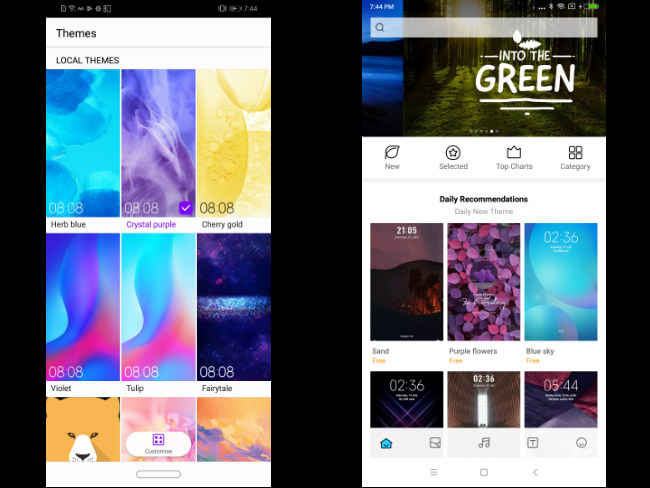
Both user interfaces are heavily customisable. You can make them look like anything. Personalisation has always been a strong point of Android devices and MIUI and EMUI offer some good looking themes and icon packs to work with. The default colour schemes of both the interfaces are different. MIUI has a lot of blue and white, while EMUI is mostly transparent or white. But you can change that.
Mi Theme in MIUI has both paid and free themes to choose from. It’s divided into what’s trending, top charts, and what’s new. You can also choose icon packs, wallpapers, ringtones and fonts individually. You also customise the existing themes to make them your own.
Similarly, the Themes app in EMUI offers a handful of themes to choose from by default. The options are not as many as compared to MIUI but you can create your own theme. However, you are restricted only to selecting a wallpaper for lockscreen and homescreen, icons, and the system font.
Verdict: In this case, Xiaomi offers a wider range of themes to choose from. It’s customisation options are also more than what EMUI provides. The winner is clearly MIUI in this case.
Status Bar/Quick Settings
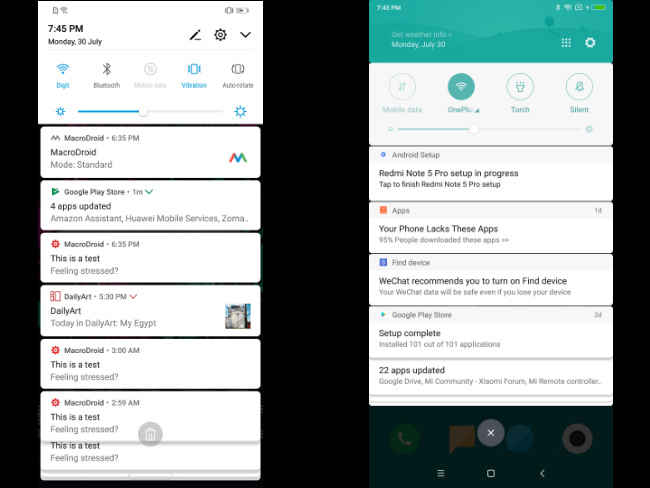
Swipe down from the homescreen and you enter the notifications shade which also houses the Quick Settings tiles. Both MIUI and EMUI have the must-have options right when you swipe down — Wi-Fi, Mobile Data, Sound and the likes. The options are a bit different in MIUI where you can toggle Bluetooth, Torch and sound profile. Expand the Quick Settings tile and you get the rest of the options. MIUI offers 16 toggles in total, while EMUI tops off at 15, but you can always add more. The brightness bar is located at the bottom of the Quick Settings tile and houses the option to toggle automatic brightness on or off.
Both UIs offer stacked notifications. Notifications from the same app is grouped and you can swipe on them to expand. Both UIs offer shortcuts within the notifications itself to take quick actions like replying to messages directly from the status bar itself.
Verdict: Tied
Bloatware
Both EMUI and MIUI come with their fair share of bloatware. The pre-installed apps are a hit or miss, but most of the time (based on observation), they remain unused. Both UIs offer their own versions of a browser, gallery, file manager, note-taker and the likes. EMUI goes beyond that to include a few games as well. All of them take up extra space and depending on the phone you buy, storage can become a constraint easily. Thankfully, most of these pre-loaded apps can be uninstalled.
Verdict: Tied
Security
Security and privacy are two vital things at a time when personal data is considered the oil that drives the digital economy. In that case, both EMUI and MIUI are fairly protected. While it doesn’t go as in-depth as Samsung’s Knox or Blackberry’s DTEK app, it’s adequate for the average joe.
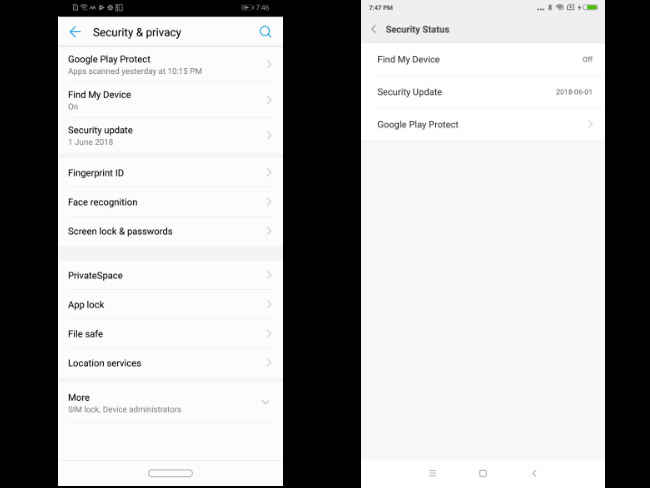
Xiaomi’s security settings are scattered across the Settings app. You can check the Security status which includes Google Play Protect, Find My Phone and security updates. Most Xiaomi phones these days offer face unlock on top of the fingerprint sensor for biometric authentication. You can also encrypt your data at the boot level. If there are more than one user using the phone, Xiaomi offers an option called Second Space that runs a separate profile which can be password protected. You can also run two instances of apps like WhatsApp and Facebook using Dual Apps. Apps can also be individually locked.
In case of EMUI, all the above options are present and housed in a more coherent manner. Furthermore, you can not only lock your apps, but also keep files under password protection. For the uninitiated, it’s easier for users of EMUI to better keep things secure, with all security and privacy features being housed under one section.
Verdict: The winner in this case is EMUI for its coherent organisation of all security features.
Settings app
Over the years, the Android operating system has become more and more complex. Newer features, options and customisations get introduced in every new version, and all that is accommodated in the Settings app. For enthusiasts, that’s a favourite place to explore and tweak. For Xiaomi users, the Settings app looks better, but the options are scattered. But it’s easy to figure what is where. Xiaomi makes it easy by putting the main categories up front. Other more nuanced options are embedded inside. In case of EMUI, it’s also more or less the same. The options are filed under different categories. Wireless & Networks houses the Wi-Fi, Bluetooth, Mobile Data and the likes. EMUI also offers suggested Settings that come up based on your usage. It’s a good way to know your device even when you’re not an enthusiast. I’ve discovered a lot new features simply for the suggestions the app offers.
Verdict: EMUI comes up on top in this case for the clean, categorised and coherent manner everything is presented. MIUI simply looks good but is actually more confusing.
Permissions management
A few years back, Google made app permissions explicit. Apps will have to specifically ask for individual permissions to access key components like phone, camera, contacts and more. The UIs also make it easier to keep a track of the permissions you’ve granted to each app. Both EMUI and MIUI, have provisions to track permissions. The Permissions section is there up front on the Settings app in MIUI and going in will show the key permissions that have been granted  to various apps. You can also check what apps have permission to autostart. EMUI has a more basic interface for it. You can only see what permission is being used by which app.
Verdict: MIUI, thus comes up on top in this case.
Cloud backup
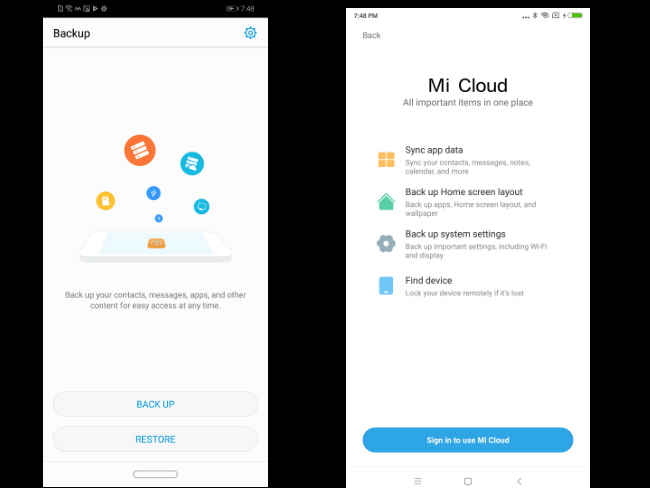
Both EMUI and MIUI have their own cloud services. Mi Cloud backs up and syncs your app data, home screen layout, system settings, text messages and more. You can also store files there. EMUI goes beyond that to allow users to store their photos as well as the current theme, and more. Both are quite capable in doing their job and is useful when you switch devices. However, with Google Drive preinstalled in both MIUI and EMUI, it does come across as a bit redundant as you can do the same using Google Drive as well.
Verdict: Tied
Gesture navigation
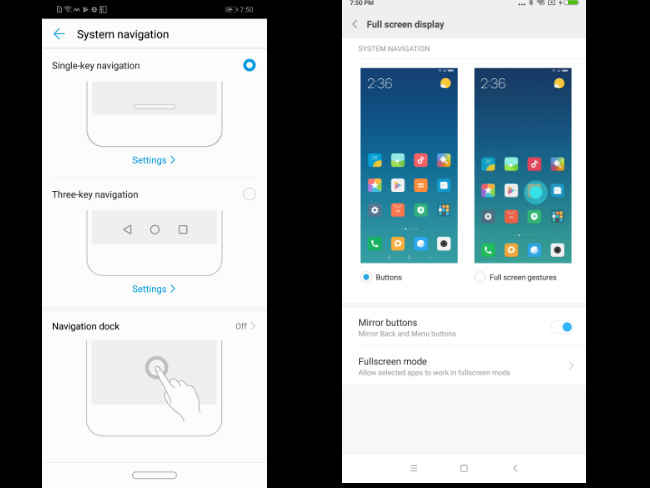
Gestures are the next big thing. The iPhone X has it. Android P will have it, and custom ROMs like MIUI and EMUI has already started to implement it. Starting from MIUI 9.5 and EMUI 8, gestures are offered as a choice. By default, you will have the traditional software navigation keys, but you can turn them on in the Settings menu. MIUI’s gestures follows the iPhone X closely. You swipe up to go back to the homescreen, swipe up and hold to go to the recent page and swipe from left or right to go back. EMUI’s gestures are more unique. You get a single bar for navigation like the iPhone X, and you can pull it left or right to access the home screen, pull up and hold to go back to the home screen, and tap on the bar to go back.
Verdict: Both are quite intuitive and the gestures become muscle memory soon enough. MIUI’s gestures a little more intuitive, for the swipe anywhere to go back option. It’s also closer to what Android P will have. The winner, in this case, is MIUI.
Accessibility
Not every phone is the same, and neither is every phone user. Both EMUI and MIUI takes it into account and offers a plethora of accessibility options. Both ROMs have a separate section for these options, but in both the cases, the option is buried deep inside a larger section. In MIUI, you can turn on one-handed use, a quick ball that houses useful shortcuts, assign shortcuts to hardware buttons, change the notification light, change headphone and sound effects and more. EMUI offers one-handed UI, motion control and voice control.
Verdict: MIUI comes on top in this case for the wide array of options it offers.
AI
Finally, the most controversial feature in ROMs these days — Artificial Intelligence. Both EMUI and MIUI claim they use machine learning to learn for your usage to offer a hassle-free, speedy experience. There’s also AI in allocating resources, pre-loading apps and even in saving battery. However, in our testing we have figured both EMUI and MIUI are quite aggressive in killing background apps to keep the UI running smooth. That results in accidental force closing of apps, delayed notifications and more. Measuring the effectiveness of these AI features is difficult as there is no objective way of determining how well they work. When they work, you won’t realise. It’s only when they don’t and the UI starts to slow down that we begin to complain.
Verdict: Reserved
In conclusion
The decision of which OS is better will come down to a very subjective choice. Sometimes, regardless of which OS offers more (or less) features, we pick a winner based on continued use. If you’re a long time Xiaomi user, chances are, you’d find switching to something else cumbersome. From a usability perspective, both EMUI and MIUI are very well fleshed out as Android ROMs. For power users, EMUI could be a better choice than MIUI, but if you want a completely hassle-free experience with some customisability, maybe MIUI is what you should settle for.

Honor Note 10 with CPU Turbo technology, 6.95-inch AMOLED display launched in China

Honor Note 10 with CPU Turbo technology, 6.95-inch AMOLED display...

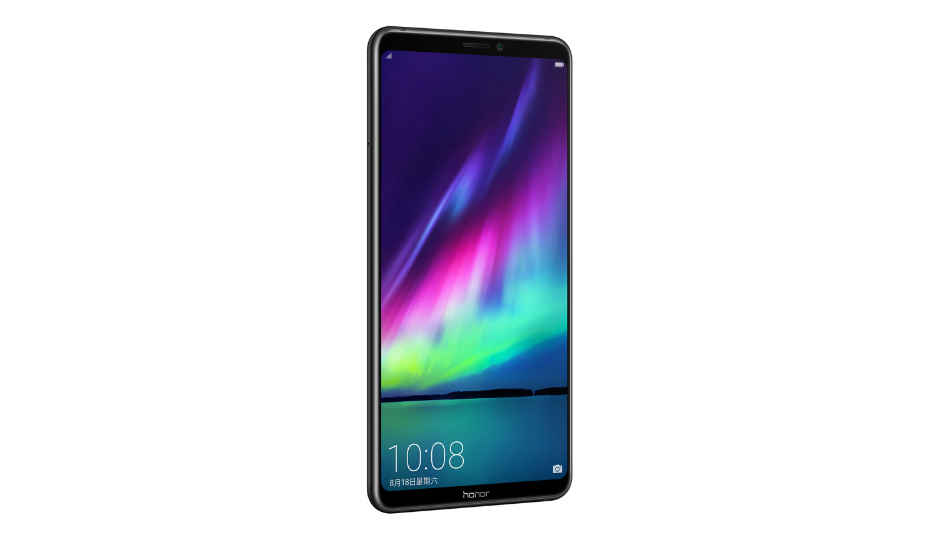
After months of teasing the device, Honor has finally launched its Honor Note 10 today at an event in China. The new device marks the next iteration of handsets in the company’s Note series, which was halted with the Honor Note 8. The Honor Note 10 features an 18.5:9 display without a notch on top and it has been launched in Phantom Blue and Midnight Black colour variants. There is also a special Lily White colour model of the device. 

Honor Note 10 Price: The Honor Note 10 comes in a 6GB RAM model with options of selecting from 64GB or 128GB of internal storage and is priced at 2799 Yuan (Rs 28,117 approx) and 3199 Yuan (Rs 32,135 approx) respectively. There is also an 8GB RAM/128GB internal storage variant of the device, which is priced at 3599 Yuan (Rs 36,148 approx). The Indian launch and pricing of the device is not known yet.

Honor Note 10 Specs:
The Honor Note 10 features a 6.95-inch Full HD+ AMOLED display, which is HDR10 compliant. The company says that there is a 20 percent increase in the display’s quality, thanks to the various AI enhancements, which are said to fill up the screen with "smart pixels." The smartphone is powered by the company’s flagship HiSilicon Kirin 970 processor that comes with a dedicated Neural Processing Unit and it also features the recently announced GPU turbo technology for delivering 60% increased performance, while reducing power consumption by 30%. To keep the device cool, Honor has added a heat dissipation coil as well and there are said to be a total of nine layers of cooling technology on the device, which is claimed to improve thermal dissipation by up to 41 percent. 
Honor has also announced its new CPU Turbo technology on the Note 10, which can also be switched on using a dedicated physical button. The company has not gone into detail as to what the feature does, but when turned on, it’s is said to overclock the CPU and perform “intelligent background cleaning” for increased performance. The feature can also be used for recording the gameplay or for streaming.
Coming to optics, the Honor Note 10 comes equipped with a 24MP + 16MP AI dual camera setup on the rear. On the front is a 13MP AI-powered sensor. The previously mentioned physical Turbo button can be used for capturing an image when using the camera app and as AI is the buzzword, the company has used it in various aspects of the device. 
The handset comes equipped with dual speakers that support Dolby Atmos and is backed by a 5000mAh battery, which supports Huawei’s proprietary SuperCharge technology. Honor claims that the smartphone can deliver up to 17.5 hours of continuous video playback on a single charge. The device sports a rear-mounted fingerprint scanner, supports Face Unlock and features a USB Type-C port for charging. One will also be able to use PC Mode with the phone and cast their device’s display to other screens using both wired and wireless connections.

Wednesday, February 21, 2018

Google reportedly making keyboard app for iOS.

Google reportedly making keyboard app for iOS

Google may be working on creating a third-party keyboard for iPhones. According to a report by The Verge, the new keyboard might be equipped with some additional features to help it stand out from the default iOS keyboard. The keyboard has been tipped to come with gesture-based typing and a dedicated button for Google search. Additionally, the keyboard may also allow search by images and GIFs. The keyboard has apparently been in circulation among Google’s employees for months. As per the report, the reason behind the keyboard may be to drive additional traffic to Google search via iOS. However, it is not yet known if or when Google will release the keyboard.
Google may not be the only company planning to release a third-party keyboard for iOS. Back in January, it was reported that Microsoft was planning to release its Word Flow keyboard for iOS. The keyboard also has a one-handed mode in which the keys are laid out like a fan. The ability to add third party keyboards to iOS was introduced with iOS 8 and keyboards such as Swype are available for purchase from the App Store

Say hello to the Airlander 10, the world's largest aircraft.

Say hello to the Airlander 10, the world’s largest aircraft

The world’s largest aircraft, the Airlander 10 has been unveiled by Hybrid Air Vehicles (HAV). The gigantic aircraft is 92 meters long, which is about 19 meters more than the length of the world’s largest passenger airliner, the Airbus A380. The aircraft is essentially a huge blimp and uses helium to create lift and the Airlander’s envelope is capable of holding about 1.3 million cubic of the gas which is needed to get off the ground. The shape of the aircraft itself provides up to 40% of the lift and HAV says that it has a payload capacity of 10,000 kgs.
The Airlander 10 comes with four V8 turbocharged diesel engines in order to generate thrust. Two engines are located on the back of the aircraft, while the remaining two are located on either side of the hull. These engines come with fins and vanes that allow thrust to be directed in certain directions. This vectoring of thrust allows the aircraft to take-off and land easily. The Airlander 10 has a cruising speed of about 80 km/hr and HAV says that the aircraft can stay airborne for about 5 days. When it comes time to land, the aircraft uses pneumatic skids located on the underside of the hull to land. These skids allow it to land on almost any surface. In addition, the skids can be ‘sucked in’ during flight in order to improve the Airlander’s aerodynamic profile. 

Now you can decide the Hyperloop routes in India.

Now you can decide the Hyperloop routes in India

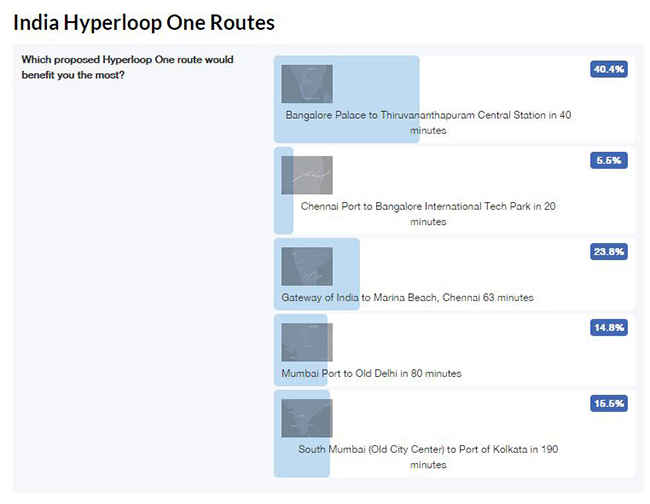
At a recent event on Feb 28, Hyperloop One, the company behind the hyperloop effort, revealed their ‘Vision for India’, in which they made a strong pitch for the Indian market to adopt the Hyperloop technology to make transportation across the country faster than ever. As part of the event, multiple routes were proposed by Hyperloop One and the teams participating in the Hyperloop One Global Challenge. And now, Hyperloop wants to know which routes you want to see in the project.
Among the options are some routes between Bengaluru and Chennai, Bengaluru and Thiruvananthapuram, Delhi-Mumbai, Mumbai-Bengaluru-Chennai and Mumbai-Kolkata.


India, vote for your fav route from 1 of our proposed 5. Now traveling doesn’t need to take days! http://bit.ly/HyperloopOneIndiaPoll …
Those of you from Mumbai who are rejoicing at the thought of so many options, as you can see, right now the popularity lies with the Bengaluru to Chennai route revealed at the event. Maybe you can blame all the techies who want to have a comfortable Dosa breakfast and report to their offices in under half hour! 
Jokes apart, the Mumbai to Kolkata route is an ambitious suggestion and will be connecting four major cities in the longest travel time (among the routes) of 190 minutes. If this route does see the light of the day, it won’t be surprising if this sees a huge amount of traffic, since the Kolkata-Hyderabad route definitely suffers from a lack of options when it comes to fast trains.

Statistically speaking, according to this Indian Railways document, the North region generates the most number of passengers (at least 50% more than any other region) if we go by passengers originating on home line. And out of the suggested routes, only the Mumbai-Delhi route services that region partially. Perhaps a few more suggestions are due. What do you think of the route options available? Which one is your favorite? Or do you have a completely different idea?